
前回の振り返りと今回の追加についてご説明させて頂きたいと思います。
1.前回の作業について
「サーバー管理台帳」から該当する日付の「作業前のノードID」を取得して「実機環境作業手続き申請書」に出力して保存されるところまでを実現いたしました。
詳しい詳細については前回の「対象の日付かつ特定の列の情報取得①(C列のみ)」を見て頂ければと思います。
https://travel-web.net/2025/12/17/vbscriptで対象の日付かつ特定の列の情報取得/
2.今回の追加点
今回は2点ほどございます。
①作業後のノードIDも「実機環境作業手続き申請書」に出力されるようにしたことです。
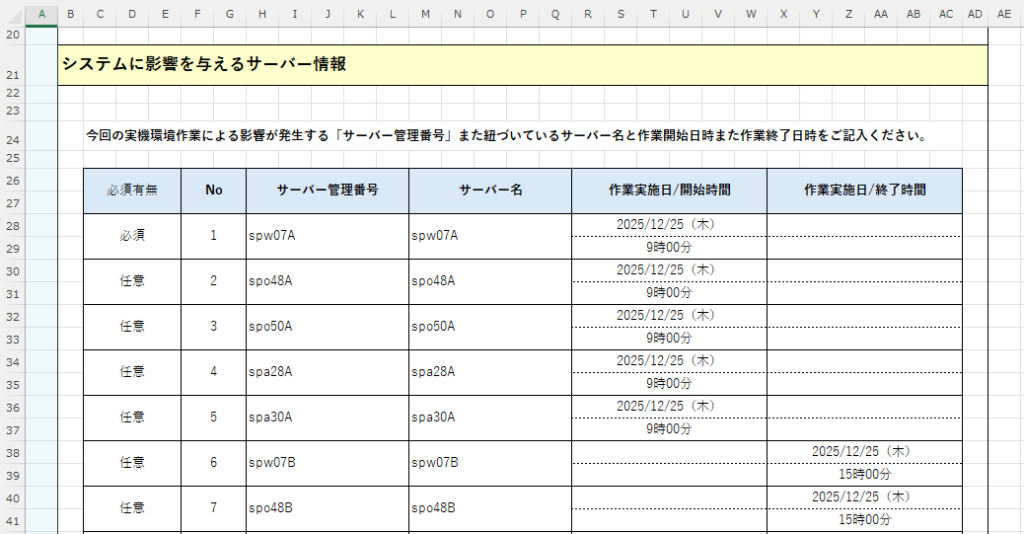
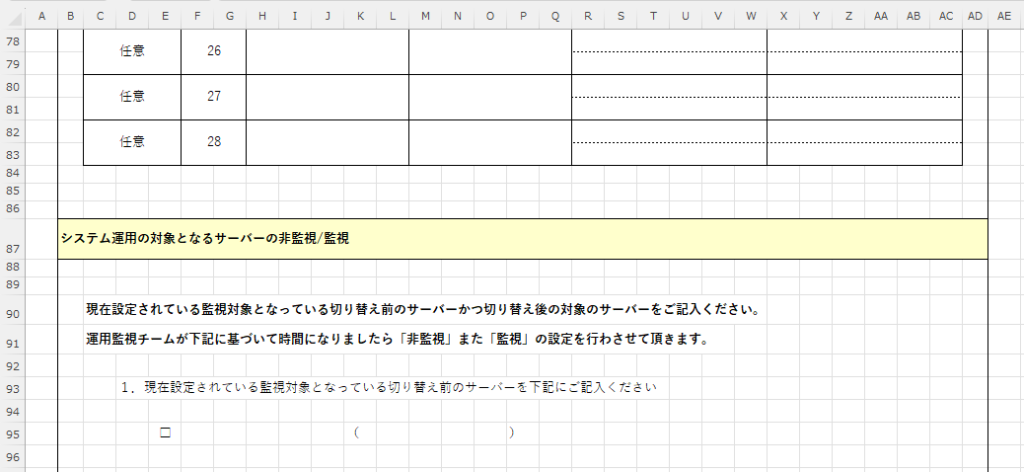
②今回は新たに87行目以降の「システム運用の対象となるサーバーの非監視/監視」も新たに追加致した上で「1.現在設定されている監視対象となっている」が何行目にあるのかを取得するものを追加致しました。
'========================================================================
' 変数の設定
'========================================================================
Dim basePath, srcPath, outPath

Dim xlApp, srcBook, srcSheet, outBook, outSheet

Dim targetDate, dataStartRow, lastRow, outRow, r, hitcount

Dim targetText, i

Dim startCopyRow, pasteRow, j

'========================================================================
' 参照元と出力先のファイルの指定してファイルを開く
'========================================================================
basePath = "C:\Users\sasio-tech.SASIO.JP\Documents\作業申請ツール"
srcPath  = basePath & "\sample_001.xlsx"
outPath  = basePath & "\sample_002.xlsx"

Set xlApp = CreateObject("Excel.Application")
xlApp.Visible = False
xlApp.DisplayAlerts = False

Set srcBook = xlApp.Workbooks.Open(srcPath)
Set srcSheet = srcBook.Sheets(1)

Set outBook = xlApp.Workbooks.Open(outPath)
Set outSheet = outBook.Sheets(2)

'========================================================================
' オートフィルタの設定を確認する
'========================================================================
Const xlCellTypeVisible = 12
Const xlUp = -4162

' サンプルコードのための動作確認のため日付を「2025/12/25」を固定化
targetDate = "2025/12/25"
dataStartRow = 4

If srcSheet.AutoFilterMode = False Then
    MsgBox "オートフィルタが設定されていません。"
    srcBook.Close False
    outBook.Close False
    xlApp.Quit
    WScript.Quit
End If

srcSheet.Range("A4").AutoFilter 7, "*" & targetDate & "*"

On Error Resume Next
srcSheet.Range("G4:G41").SpecialCells xlCellTypeVisible
If Err.Number <> 0 Then
    MsgBox "対象日付のデータがありません。"
    Err.Clear
    srcBook.Close False
    outBook.Close False
    xlApp.Quit
    WScript.Quit
End If
On Error GoTo 0

lastRow = srcSheet.Cells(srcSheet.Rows.Count, "G").End(xlUp).Row

'========================================================================
' 参照元ファイルのC列から出力先ファイルのH列に出力する処理
'========================================================================
hitcount = 0
outRow = 28

For r = dataStartRow To lastRow
    If srcSheet.Rows(r).Hidden = False Then
        If Trim(srcSheet.Cells(r, "G").Value) <> "" Then

            'H列にサーバー管理番号を出力
            outSheet.Cells(outRow, "H").Value = srcSheet.Cells(r, "C").Value

            'M列にサーバー名を出力
            outSheet.Cells(outRow, "M").Value = srcSheet.Cells(r, "C").Value

            'X列に「作業実施日/開始時間」を出力
            outSheet.Cells(outRow, "R").Value = srcSheet.Cells(r, "G").Value
            outSheet.Cells(outRow+1, "R").Value = "9時00分"

            outRow = outRow + 2
            hitcount = hitcount + 1
        End If
    End If
Next

'========================================================================
' 参照元ファイルのD列から出力先ファイルのH列に出力処理(C列の続き)
'========================================================================
For r = dataStartRow To lastRow
    If srcSheet.Rows(r).Hidden = False Then
        If Trim(srcSheet.Cells(r, "G").Value) <> "" Then

            'H列にサーバー管理番号を出力
            outSheet.Cells(outRow, "H").Value = srcSheet.Cells(r, "D").Value

            'M列にサーバー名を出力
            outSheet.Cells(outRow, "M").Value = srcSheet.Cells(r, "D").Value

            'X列に「作業実施日/終了時間」を出力
            outSheet.Cells(outRow, "X").Value = srcSheet.Cells(r, "G").Value
            outSheet.Cells(outRow+1, "X").Value = "15時00分"

            outRow = outRow + 2
            hitcount = hitcount + 1
        End If
    End If
Next

MsgBox "対象日付 " & targetDate & " は " & hitcount & " 件です。"

'========================================================================
' コピーして挿入する行の処理
'========================================================================
targetText = "1.現在設定されている監視対象となっている"

lastRow = outSheet.Cells(outSheet.Rows.Count, "D").End(xlUp).Row

For r = 83 To lastRow
    If InStr(outSheet.Cells(r, "D").Value, targetText) > 0 Then
        startCopyRow = r
        Exit For
    End If
Next

MsgBox "対象文字はD列" & startCopyRow & "行目にございます"

srcBook.Close False
outBook.Save
outBook.Close
xlApp.Quit