
今回、基本となるコード(「CSS」と「HTML」)は割愛させて頂きますので最初のコードを確認したい場合は下記を
ご参照頂きますようお願いたします。
参照先:Excelの資料の業務ツール①(フォーマット作成)
https://travel-web.net/2025/12/01/excelの資料の業務ツール①/
前回は罫線を引くことまでは想定と入れておらず、あくまでもExcelのファイルを作成かつ
列数を指定して表が表れて入力した情報がExcelのファイル作成されるところまで公開致しました。
今回は、罫線を引くところ開始位置がB列以降であればA列を狭める所のみを追記したいと思います。
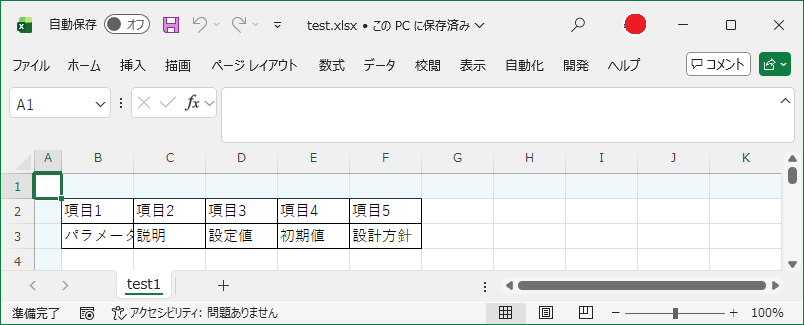
コードは以下となります。
script language="VBScript">

Dim maxCols
maxCols = 10

' 初期化 Sub
Sub Init()
    Dim i, opt

    ' 列数プルダウン初期化
    Do While colSelect.options.length > 0
        colSelect.remove 0
    Loop

    For i = 1 To maxCols
        Set opt = document.createElement("OPTION")
        opt.innerText = i & " 列"
        opt.value = i
        colSelect.appendChild opt
    Next

    colSelect.value = 3

    UpdateInputs
End Sub

' Excel列入力欄描画
Sub UpdateInputs()
    Dim cols, i, html
    cols = CLng(colSelect.value)

    html = "<table><tr>"

    ' 見出し
    For i = 1 To cols
        html = html & "<td>項目" & i & "</td>"
    Next

    html = html & "</tr><tr>"

    ' 入力欄
    For i = 1 To cols
        html = html & "<td><input type='text' id='txt" & i & "'></td>"
    Next

    html = html & "</tr></table>"

    inputArea.innerHTML = html
End Sub

' Excel作成 Sub
Sub CreateExcel()
    Dim saveFolder, fileName, sheetName, fullPath
    Dim xl, wb, i, cols
    Dim startCol, startRow

    ' 基本情報取得
    saveFolder = Trim(txtFolder.value)
    fileName   = Trim(txtFile.value)
    sheetName  = Trim(txtSheet.value)
    startCol   = CLng(Trim(txtStartCol.value))
    startRow   = CLng(Trim(txtStartRow.value))

    If saveFolder = "" Or fileName = "" Or sheetName = "" Then
        MsgBox "格納先・ファイル名・シート名をすべて入力してください。", 48, "未入力"
        Exit Sub
    End If

    ' 拡張子補正
    If LCase(Right(fileName, 5)) <> ".xlsx" Then
        fileName = fileName & ".xlsx"
    End If

    fullPath = saveFolder & "\" & fileName

    ' Excel操作
    cols = CLng(colSelect.value)

    ' Excel起動・Workbook作成
    Set xl = CreateObject("Excel.Application")
    xl.Visible = False
    xl.DisplayAlerts = False
    Set wb = xl.Workbooks.Add()

    ' シート名変更
    wb.Sheets(1).Name = sheetName

    ' 見出し
    For i = 1 To cols
        wb.Sheets(1).Cells(startRow, startCol + i - 1).Value = "項目" & i
    Next

    ' データ
    For i = 1 To cols
        wb.Sheets(1).Cells(startRow + 1, startCol + i - 1).Value = document.getElementById("txt" & i).value
    Next

    ' 罫線追加
    Dim lastCol, lastRow
    lastCol = startCol + cols - 1
    lastRow = startRow + 1
    With wb.Sheets(1).Range(wb.Sheets(1).Cells(startRow, startCol), wb.Sheets(1).Cells(lastRow, lastCol)).Borders
        .LineStyle = 1
        .Weight = 2
    End With

    ' 列幅調整(開始列が1の場合)
    If startCol <> 1 Then
        MsgBox "開始列が1ではないので1列目の幅を半分にします"
        wb.Sheets(1).Columns(1).ColumnWidth = wb.Sheets(1).Columns(1).ColumnWidth / 3
    End If

    ' 保存・終了
    wb.SaveAs fullPath
    wb.Close
    xl.Quit

    Set wb = Nothing
    Set xl = Nothing

    MsgBox "Excel 作成完了" & vbCrLf & fullPath
End Sub

</script>